

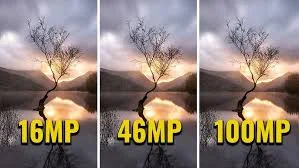
Walk through any security camera listing and the megapixel numbers leap out first: two megapixels, four, eight, and beyond. It is easy to assume that bigger is simply better, and that the highest number on the page is the safest buy. The reality is more nuanced. Resolution matters, but it is only one part of what makes footage genuinely useful, and chasing the largest figure can lead you to overspend on capability you will never use, or worse, to overlook the factors that actually determine image quality.
This article unpacks what resolution really does, where it helps, and why the smartest buyers weigh it against everything else rather than treating it as the only number that counts.
What Resolution Actually Buys You
Resolution describes how much detail an image contains, expressed in pixels. More pixels mean you can zoom into a frame and still make out fine detail, such as a face across a courtyard or characters on a distant sign. For wide scenes where you may need to identify someone or something far from the camera, higher resolution like in Football Endzone Camera Systems is a real advantage. The catch is that those extra pixels only help if the rest of the system is built to take advantage of them.
The Trade-offs Nobody Mentions on the Box
Higher-resolution cameras generate substantially more data. That means larger files, faster-filling storage, and heavier demands on your network and recorder. A bank of eight-megapixel cameras can overwhelm an undersized recorder or eat through storage far more quickly than expected, forcing you to either reduce retention time or spend more on infrastructure than you did on the cameras themselves.
There is also the question of low-light performance. Cramming more pixels onto a sensor of the same physical size can actually hurt image quality after dark, because each pixel gathers less light. A well-designed lower-resolution camera frequently outperforms a higher-resolution rival in the dim conditions where surveillance footage tends to matter most.
Lens, Sensor, and Lighting Matter Just as Much
A sharp lens, a quality sensor, and sensible lighting often do more for usable footage than raw pixel count. A modest camera with excellent optics and good light will reliably beat a high-megapixel unit struggling behind a cheap lens in a poorly lit space. When you evaluate a camera, look past the headline number to how it handles glare, motion, and darkness, since those are the conditions that separate footage you can act on from footage that merely fills a hard drive.
Matching Resolution to the Job
The practical approach is to match resolution to each specific view rather than buying one figure for everything. An entrance where you need to recognize faces benefits from higher resolution; a narrow indoor hallway rarely does. If you take a moment to explore a full catalog of cameras, you will find options spanning a range of resolutions precisely because different scenes call for different tools. Choosing per location, rather than defaulting to the largest number available, is how you get strong coverage without wasting budget or overloading your storage.
Frame Rate and Compression Deserve Attention Too
Resolution describes how detailed each frame is, but two other settings quietly shape how usable your footage turns out. Frame rate determines how smoothly motion is captured. A low frame rate can turn a fast-moving subject into a series of disconnected blurs, losing the very moment you needed, while a higher frame rate captures movement cleanly at the cost of more storage. For most general surveillance a moderate frame rate is plenty, but areas with quick movement may warrant more.
Compression is the other half of the equation. Modern codecs shrink video files dramatically so that high-resolution footage does not overwhelm your storage, but aggressive compression can introduce artifacts that soften fine detail, partly undoing the benefit of those extra megapixels. A camera that pairs strong resolution with an efficient, modern codec gives you the best of both worlds: clear images that do not consume storage at an unsustainable rate.
Looking at these settings alongside resolution is what separates an informed purchase from a number-driven one. A balanced configuration almost always produces more useful footage than maxing out a single specification and hoping the rest of the system can keep up with the load it creates.
The Takeaway
Resolution is worth understanding, but it should never be the only thing you weigh. Think about the scene each camera will cover, the storage and network behind it, and how it will perform in poor light. Balanced this way, a thoughtfully chosen system delivers clear, usable footage where it counts and avoids paying a premium for detail that disappears into a full hard drive. More megapixels can be the right answer, but only when the whole system is ready to make use of them.
