

When choosing a VPS hosting solution, one of the most important decisions is the virtualization technology behind it. Two of the most well-known virtualization systems are KVM and OpenVZ. While both are designed to create isolated virtual environments on a physical server, they work very differently and offer distinct advantages depending on the use case.
Understanding the difference between KVM and OpenVZ can help businesses, developers, and website owners choose the right hosting environment for performance, flexibility, scalability, and security.
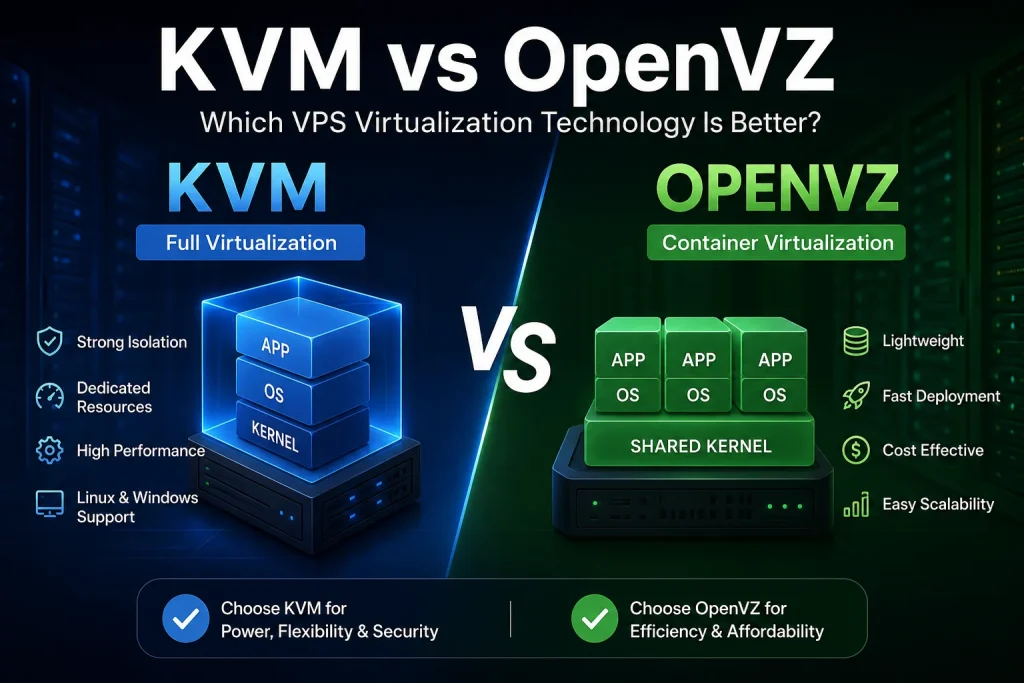
What Is KVM Virtualization?
KVM stands for Kernel-based Virtual Machine. It is a full virtualization solution built directly into the Linux kernel. Each KVM VPS acts like an independent virtual machine with its own dedicated kernel, operating system, and allocated resources.
This means users get greater control over their environment, similar to having a dedicated server.
Key Features of KVM
- Dedicated CPU, RAM, and storage allocation
- Full root access and kernel customization
- Ability to run multiple operating systems
- Better isolation between virtual machines
- High compatibility with modern applications
KVM is commonly preferred for production environments, enterprise applications, custom server setups, and workloads requiring strong stability.
What Is OpenVZ?
OpenVZ is a container-based virtualization technology for Linux servers. Instead of creating fully independent virtual machines, OpenVZ uses isolated containers that share the host system’s kernel.
Because containers share resources more efficiently, OpenVZ environments are generally lightweight and cost-effective.
Key Features of OpenVZ
- Lower resource usage
- Faster deployment
- Lightweight virtualization
- Cost-efficient hosting
- Easy scalability
OpenVZ is often used for small websites, development environments, testing projects, and applications with lower resource demands.
KVM vs OpenVZ: Main Differences
1. Virtualization Type
The biggest difference lies in how virtualization works.
- KVM uses full virtualization, creating fully isolated virtual machines.
- OpenVZ uses container virtualization, where containers share the host kernel.
This gives KVM stronger isolation and flexibility, while OpenVZ focuses more on efficiency and lightweight performance.
2. Operating System Support
KVM supports multiple operating systems because every VPS has its own kernel.
With KVM, users can run:
- Linux distributions
- Windows Server
- BSD systems
- Custom kernels
OpenVZ is limited to Linux-based environments because all containers share the same Linux kernel from the host node.
If Windows hosting or custom kernel modules are required, KVM is the better choice.
3. Performance and Resource Allocation
KVM provides dedicated resources to each VPS. This leads to more predictable performance, especially during high workloads.
OpenVZ uses shared resources more dynamically, which can sometimes lead to performance fluctuations if neighboring containers consume excessive resources.
KVM Advantages
- Stable performance
- Dedicated RAM allocation
- Better for high-traffic applications
- Improved workload consistency
OpenVZ Advantages
- Lower overhead
- Faster container startup
- Efficient resource sharing
- Budget-friendly hosting
4. Security and Isolation
KVM offers stronger isolation because each VPS operates independently with its own virtual hardware environment.
In OpenVZ, all containers share the same kernel, meaning vulnerabilities at the kernel level could potentially affect multiple containers.
For businesses handling sensitive data or mission-critical applications, KVM is generally considered more secure.
5. Customization Flexibility
KVM allows advanced customization, including:
- Kernel modifications
- Custom firewall configurations
- Specialized software environments
- Nested virtualization
OpenVZ environments are more restricted due to shared kernel architecture.
Developers who require complete control over the server environment usually prefer KVM.
Performance Comparison
KVM Performance
y=\frac{Dedicated\ Resources}{Workload\ Demand}
KVM performs exceptionally well for:
- High-traffic websites
- Databases
- Game servers
- Enterprise applications
- Resource-intensive workloads
Because resources are reserved, performance remains stable even under heavy usage.
OpenVZ Performance
y=\frac{Shared\ Resources}{Active\ Containers}
OpenVZ is optimized for:
- Lightweight websites
- Testing environments
- Development servers
- Small applications
- Cost-sensitive projects
Its low overhead makes it highly efficient for basic workloads.
Which One Is Better for Hosting?
The answer depends on your requirements.
Choose KVM If You Need:
- Stronger security
- Dedicated resources
- Windows VPS support
- Full server customization
- Stable long-term performance
- Enterprise-grade hosting
Choose OpenVZ If You Need:
- Affordable VPS hosting
- Lightweight Linux environments
- Fast deployment
- Simple web hosting
- Development or testing servers
Final Thoughts
Both KVM and OpenVZ have their place in modern VPS hosting environments. OpenVZ remains a practical option for lightweight projects and budget hosting, while KVM delivers stronger isolation, flexibility, and performance for professional workloads.
For businesses running production applications, eCommerce platforms, or high-performance websites, KVM is often the preferred solution due to its dedicated resources and advanced virtualization capabilities.
However, for startups, developers, or users seeking affordable Linux hosting, OpenVZ can still provide excellent value with efficient resource utilization.
Choosing the right virtualization technology ultimately depends on your project requirements, budget, scalability goals, and desired level of control.
