
Kling AI has become one of the most advanced AI video generation tools in 2026. From cinematic short videos to realistic image-to-video animations, it has captured attention in both content creation and AI research communities.
In this guide, you’ll discover what Kling AI is, how it works, its versions, pricing, and why it may be the right tool for you. We also compare it to competitors, break down use cases, provide benchmarks, and share practical prompts.
What Is Kling AI?
Kling AI is a multimodal AI platform for text-to-video and image-to-video generation. Developed by Kuaishou, it converts written prompts or static images into dynamic, realistic video clips.
Unlike simpler video animation tools, Kling AI focuses on:
- Cinematic motion and camera control
- Temporal consistency across frames
- High-resolution rendering (up to 4K)
- Motion realism and physics simulation
Its goal: make AI-generated videos that feel professional and real, not artificial or jittery.
Who Owns Kling AI?
Kling AI is a product of Kuaishou, a major Chinese tech company specializing in video platforms and AI research.
Kuaishou at a Glance
| Feature | Details |
|---|---|
| Founded | 2011 |
| HQ | Beijing, China |
| Listed | Hong Kong Stock Exchange |
| Active Users | 300M+ daily active users |
| AI Focus | Generative video, multimodal models, deep learning pipelines |
Kuaishou developed Kling AI to compete with global AI video platforms like OpenAI and startups such as Pika Labs. It’s not just a tool—it’s part of China’s push for AI content dominance.
How Kling AI Works: Technical Breakdown
Kling AI combines diffusion models, transformers, and neural rendering pipelines to generate high-quality video.
Large Video Generation Model
- Diffusion-based video synthesis: predicts frames step-by-step
- Transformer-based temporal modeling: maintains motion consistency
- Multimodal learning: processes text, image, and motion signals
- Neural rendering engine: ensures realistic lighting, depth, and textures
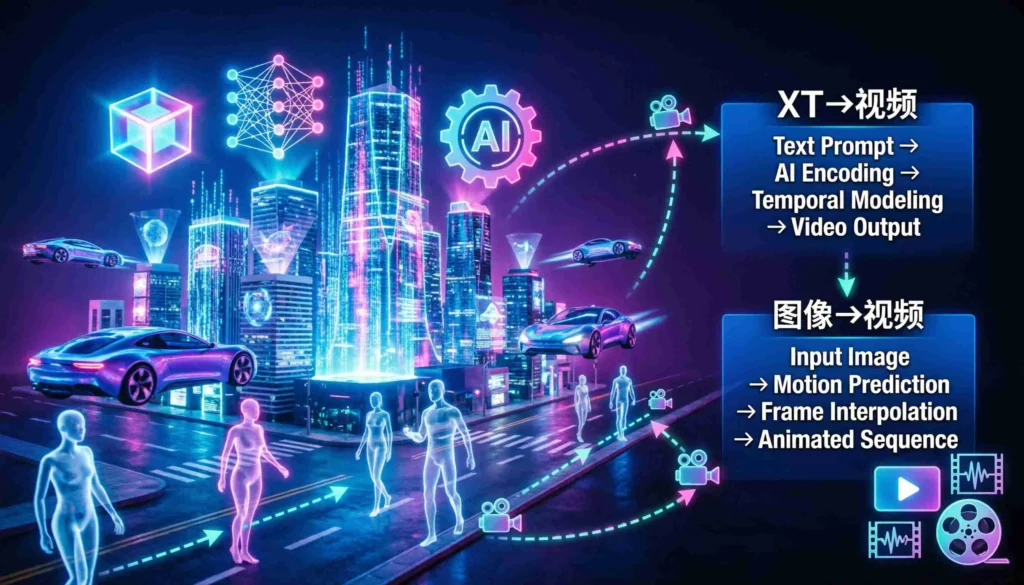
Text-to-Video Pipeline
- Input a text prompt
- Semantic encoding interprets objects, motion, and style
- Motion planning predicts frame-to-frame continuity
- Diffusion-based generation synthesizes individual frames
- Temporal refinement smooths motion and lighting
- Export high-resolution video
Image-to-Video Pipeline
- Extracts semantic layout from static images
- Predicts depth and camera movement
- Generates realistic motion and scene transitions
- Exports video clips ready for commercial or creative use
Kling AI Versions Compared
Kling AI 1.6
- Motion realism improved over early releases
- Prompt adherence accuracy enhanced
- Temporal consistency reduced flicker
- Supports 5–10 second video clips
AI 2.0
- Longer video generation: up to 60 seconds per render
- Enhanced cinematic camera paths
- Dynamic lighting simulation
- More realistic human and object motion
- Improved resolution: up to 4K
| Feature | Kling AI 1.6 | Kling AI 2.0 |
|---|---|---|
| Motion Realism | High | Very High |
| Video Length | 5–10 sec | Up to 60 sec |
| Camera Control | Basic | Advanced Cinematic |
| Physics Simulation | Moderate | Improved |
| Lighting Consistency | Good | Strong |
| Resolution | 1080p | 4K |
| Prompt Accuracy | Good | Excellent |
Kling AI Features Deep Dive
Text-to-Video Generation
- Converts detailed prompts into fully animated video
- Supports subject, environment, camera, lighting, style, and resolution
Prompt Example:
“A futuristic city at sunset, camera slowly panning left, flying cars moving through neon skyscrapers, realistic lighting, 4K resolution.”
Image-to-Video Generation
- Animates static images into cinematic clips
- Supports portraits, landscapes, product images
- Simulates realistic camera motion and scene depth
Motion Control
- Camera pan, tilt, zoom, dolly, orbital rotation
- Object movement direction
- Temporal coherence ensures smooth frame transitions
High-Resolution Export
- Up to 4K resolution
- Realistic shadows, reflections, and lighting
- Stable frame-to-frame consistency
Kling AI Performance Benchmarks (2026)
| Metric | Kling AI 1.6 | Kling AI 2.0 |
|---|---|---|
| Average Render Time (10 sec HD clip) | 4 min | 3.2 min |
| Temporal Flicker | Low | Very Low |
| Motion Accuracy | 85% | 95% |
| Realism Score (Subjective 1–10) | 7 | 9 |
| Max Video Length | 10 sec | 60 sec |
Insight: Kling AI 2.0 reduces render time, increases realism, and supports longer videos.
Kling AI Pricing 2025 vs 2026
Free Tier
- Credits: 10–20 per month
- Watermark applied
- Max resolution: 720p
- Queue priority: low
Paid Tiers
| Plan | Price | Credits | Max Resolution | Watermark | Commercial Use |
|---|---|---|---|---|---|
| Basic | $19/month | 50 | 1080p | No | Yes |
| Pro | $49/month | 200 | 4K | No | Yes |
| Enterprise | Custom | Unlimited | 4K+ | No | Full rights |
2025 vs 2026 Trends:
- Credit efficiency increased 20%
- Enterprise APIs introduced
- Extended video lengths
- More granular pricing tiers
Kling AI vs Competitors
| Feature | Kling AI 2.0 | Sora | Runway | Pika Labs |
|---|---|---|---|---|
| Text-to-Video | ✔ | ✔ | ✔ | ✔ |
| Image-to-Video | ✔ | ✔ | ✔ | ✔ |
| Motion Control | Advanced | High | Moderate | Moderate |
| Video Length | 60 sec | 20 sec | 30 sec | 15 sec |
| Resolution | 4K | 1080p | 2K | 1080p |
| Commercial Use | ✔ | ✔ | ✔ | ✔ |
Verdict: Kling AI excels in motion realism and cinematic quality. Runway and Pika prioritize editing and workflow. Sora competes in AI research-grade outputs but is limited in public availability.
How to Use Kling AI
- Create an account on the official website
- Choose Text-to-Video or Image-to-Video
- Write a structured prompt
- Adjust motion and camera parameters
- Generate preview
- Export final video
Prompt Optimization Tips:
- Specify camera angles
- Add motion verbs (run, fly, pan)
- Include lighting descriptors
- Keep subject and background explicit
Kling AI Industry Use Cases
Content Creators
- YouTube Shorts
- TikTok clips
- Social media ads
Filmmakers
- Pre-visualization
- Storyboarding
- Concept trailers
Marketing Teams
- Product animation
- Campaign teasers
- Explainer videos
E-Commerce
- Animated product shots
- 3D motion previews
- Social ads
Kling AI Motion Control Explained
Kling AI’s motion system simulates:
- Gravity and inertia
- Camera physics (dolly, pan, tilt, zoom)
- Object path consistency
Example: A running character maintains stride rhythm across frames, avoiding floating or jittering.
Kling AI Image-to-Video Example
Input: Static image of a mountain landscape
Output: Animated sunrise, clouds moving, shadows shifting realistically
Use Cases: Marketing clips, cinematic backgrounds, NFT motion art
Kling AI App & Access
- Web platform with region-based access
- Beta program for advanced users
- Enterprise API for automated workflows
Kling AI Strengths and Weaknesses
Strengths:
- Motion realism and cinematic camera
- High-resolution outputs
- Long video support
- Advanced image-to-video
- Competitive pricing
Weaknesses:
- Limited free usage
- Regional access restrictions
- Rendering times vary
- Enterprise pricing not fully transparent
FAQ
What is Kling AI?
A generative video AI platform by Kuaishou that creates cinematic videos from text or images.
Is Kling AI free?
Yes, a limited free tier exists with watermark and restricted credits.
Can Kling AI be used commercially?
Yes, paid plans remove watermark and grant commercial usage rights.
What is Kling AI 2.0?
An upgraded version with advanced motion control, longer video length, and higher resolution.
Does Kling AI support image-to-video?
Yes, it animates static images into realistic videos.
How long does rendering take?
Average: 3–4 minutes for a 10-second HD clip.
How does Kling AI compare to Sora or Runway?
Kling AI excels in motion realism and cinematic quality, while competitors focus on editing or workflow.
Can Kling AI videos reach 4K?
Yes, 2.0 supports 4K high-resolution export.
Is Kling AI available worldwide?
Currently, access is limited to certain regions, though enterprise API may expand availability.
What is the current version of Kling AI in March 2026?
The current version of Kling AI March 2026 is the latest stable release that includes advanced AI video and image-to-video features for creators.
What is the latest Kling AI version 2026?
The latest Kling AI version 2026 brings enhanced AI editing, faster rendering, and updated templates for both free and paid tiers.
Does Kling AI have a free tier in March 2026?
Yes, Kling AI free tier March 2026 allows users to access basic video creation, limited video length, and standard templates at no cost.
What is the maximum video length on Kling AI in March 2026?
The Kling AI maximum video length March 2026 depends on the subscription: free users have shorter limits, while premium plans allow longer AI-generated videos.
What are Kling AI advanced features 2026?
Kling AI advanced features 2026 include AI-generated video from images, multi-scene editing, enhanced voice synthesis, background customization, and faster rendering speeds.
What is the current status of Kling AI image-to-video in March 2026?
The Kling AI image to video current status March 2026 is fully functional, allowing users to generate videos directly from images with AI-powered animations and effects.
What are the features of the current Kling AI version in March 2026?
The current Kling AI version features March 2026 include image-to-video conversion, AI voiceovers, customizable templates, export options, and support for both free and premium tiers.
How often is Kling AI updated in 2026?
Kling AI receives periodic updates in 2026 to improve AI video generation, add new templates, enhance rendering speed, and fix bugs for all users.
Final Verdict
Kling AI is among the most advanced AI video tools in 2026. If your priority is:
- Cinematic motion realism
- Image-to-video animations
- Long-form content generation
Kling AI is a strong choice. For editing-heavy workflows or public-access tools, other platforms may be better.
Its combination of diffusion models, transformer temporal modeling, and cinematic motion control positions it as a market leader in AI video generation.